
Tofu + HubSpot: The Complete AI Marketing Integration Guide in 2026
Last updated: May 13, 2026
The Tofu + HubSpot integration connects Tofu, an AI-native B2B marketing platform, directly to your HubSpot CRM and Marketing Hub instance. This integration enables marketing teams to pull contact, company, and deal data from HubSpot into Tofu's AI content engine, generate personalized campaign assets at scale, and push finished content back into HubSpot workflows, sequences, and smart content modules without manual export-import steps. If your team runs HubSpot as its system of record and needs to produce personalized landing pages, emails, ads, one-pagers, and sales collateral for dozens or hundreds of target accounts, this integration eliminates the content bottleneck that prevents most ABM programs from scaling past a handful of accounts. This guide covers every detail a marketing ops professional needs: how the data flows, how to set it up, what use cases it unlocks, what syncs and what does not, and answers to the most common technical questions.
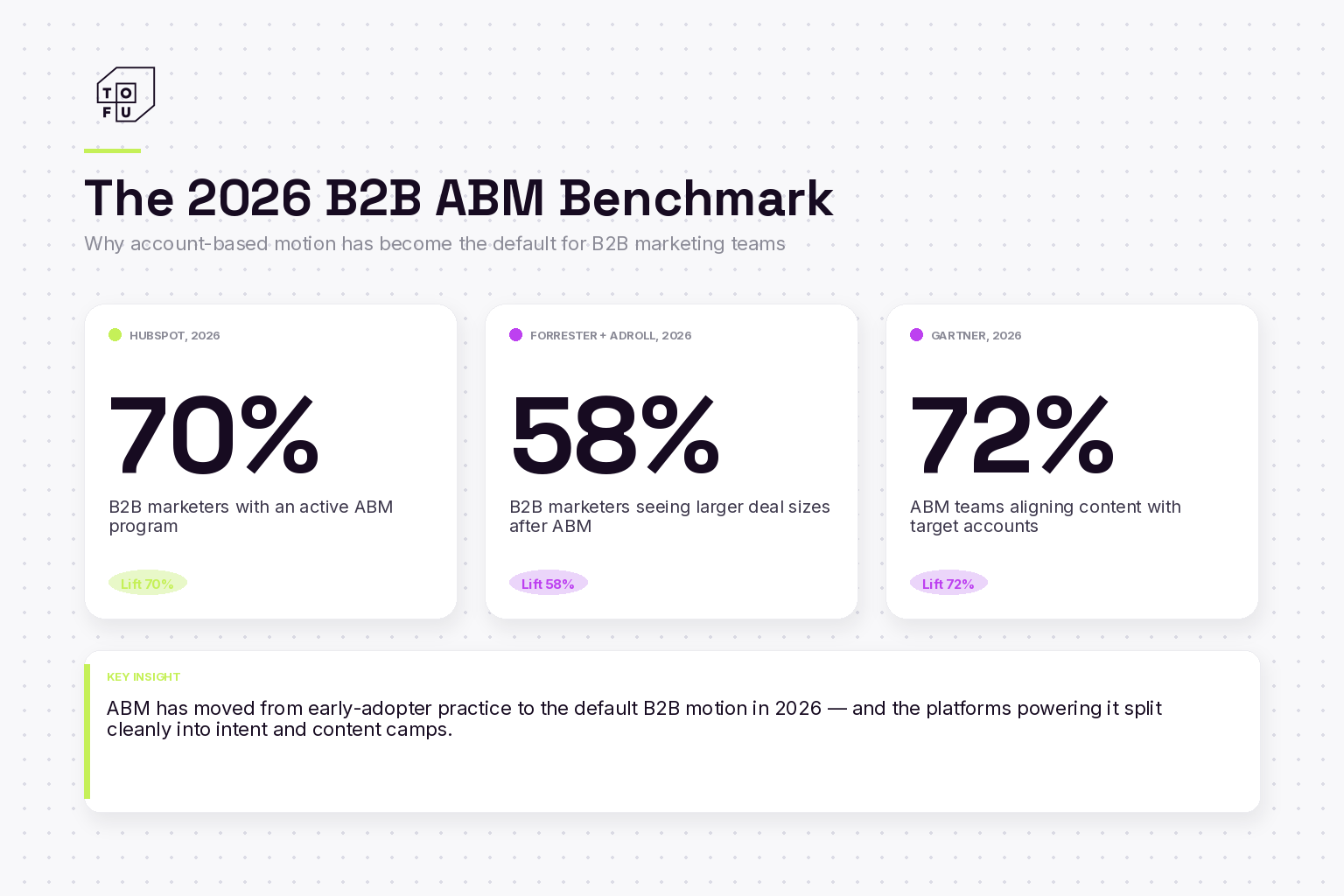
The market context: According to HubSpot (2026), 70% of B2B marketers have an active ABM program in place (HubSpot State of Marketing). According to Forrester and AdRoll (2026), 58% of B2B marketers see larger deal sizes after adopting ABM (Forrester x AdRoll 2026 ABM Report), and according to Gartner (2026), 72% of ABM teams use it specifically to align content strategy with target accounts. Our evaluation methodology assesses each platform on the evaluation criteria ABM buyers prioritize: core strength, intent data, content generation, account targeting, integrations, pricing, team fit, and stack role.
What the Integration Does
At its core, the Tofu + HubSpot integration creates a bidirectional data bridge between your CRM and Tofu's AI content generation engine. HubSpot serves as the source of truth for your account and contact data, deal stages, lifecycle stages, engagement history, and list membership. Tofu uses that data to generate personalized campaign content, then delivers finished assets back into HubSpot where they can be deployed through your existing marketing and sales workflows.
The integration operates through HubSpot's official OAuth-based API, meaning your HubSpot admin grants Tofu specific read and write permissions during setup. No third-party middleware like Zapier or Workato is required, although those tools can complement the native integration for edge-case workflows. The connection handles authentication, token refresh, and rate limiting automatically.
Here is what the integration enables in practical terms. Your marketing team creates a campaign brief in Tofu, which specifies the campaign theme, value propositions, target personas, and asset types needed. Tofu pulls the relevant account and contact data from HubSpot to personalize each asset. The AI engine then generates complete, production-ready content: landing pages tailored to each target account's industry, tech stack, and pain points; email copy that references the prospect's specific situation; one-pagers that speak directly to the buyer's role; and ad variations optimized for each segment. Those assets are then pushed back into HubSpot as email templates, landing page modules, or linked assets attached to contact or deal records.
The result is that your HubSpot instance becomes both the data source that fuels personalization and the delivery mechanism that gets personalized content in front of prospects, all without requiring your team to manually create or upload individual assets.
How Data Flows Between Tofu and HubSpot
Understanding the data flow is essential for marketing ops teams who need to ensure data integrity, manage permissions, and troubleshoot issues. The integration moves data in two directions, with clear boundaries around what Tofu reads versus what it writes.
| Direction | Data Type | What Gets Transferred | How It Is Used |
|---|---|---|---|
| HubSpot → Tofu | Company Records | Company name, industry, size, revenue, domain, custom properties | Account-level personalization of landing pages, emails, and collateral |
| HubSpot → Tofu | Contact Records | Name, title, role, lifecycle stage, list memberships, engagement history | Persona-level content targeting and messaging customization |
| HubSpot → Tofu | Deal Records | Deal stage, amount, close date, associated contacts and companies | Stage-appropriate sales collateral generation |
| HubSpot → Tofu | Lists & Segments | Active and static list membership, smart list criteria | Determines which accounts receive which campaign content |
| HubSpot → Tofu | Form Submissions | Form name, submission data, timestamp, associated contact | Triggers event-based follow-up content generation |
| Tofu → HubSpot | Email Templates | Personalized email HTML, subject lines, preview text | Available in HubSpot sequences, workflows, and manual sends |
| Tofu → HubSpot | Landing Page Content | Personalized page sections, copy blocks, CTA text | Populated into HubSpot landing page smart content modules |
| Tofu → HubSpot | Asset Links & Files | URLs for generated one-pagers, PDFs, microsites | Attached to contact/deal timeline as notes or custom properties |
| Tofu → HubSpot | Engagement Data | Content view events, asset download timestamps, time on page | Written to contact timeline for lead scoring and sales visibility |
Data syncs are near-real-time for most operations. When a contact record is updated in HubSpot, the change is reflected in Tofu within minutes through webhook-based listeners. Bulk syncs for large list imports or initial account loads run on a scheduled cadence, typically every 15 minutes. Asset delivery from Tofu back to HubSpot happens immediately upon content generation and approval.
Setup Guide
Setting up the integration requires HubSpot Super Admin permissions and a Tofu account with the integration tier enabled. The entire process takes 20 to 40 minutes depending on the complexity of your HubSpot configuration. Below is the step-by-step process.
Step 1: Connecting Your HubSpot Account
Start in your Tofu workspace by navigating to Settings → Integrations → HubSpot. Click Connect HubSpot to begin the OAuth flow. You will be redirected to HubSpot where you will need to select the HubSpot portal you want to connect. If you manage multiple portals, make sure you select the correct one as you can only connect one portal per Tofu workspace.
During the OAuth flow, HubSpot will display the specific permissions Tofu is requesting. These include:
- Read access to contacts, companies, deals, lists, forms, and custom objects
- Write access to email templates, contact properties (custom Tofu properties only), notes, and timeline events
- Read access to workflows (for trigger configuration, not modification)
- File upload access for pushing generated assets to the HubSpot file manager
Tofu does not request or receive write access to your existing HubSpot workflows, sequences, or automation rules. It creates its own templates and assets, which you then manually or programmatically incorporate into your workflows. This protects your existing marketing automation from unintended changes.
Step 2: Syncing Contact and Company Data
After authentication, Tofu runs an initial data sync that pulls your HubSpot company and contact records into the platform. Depending on your database size, this can take anywhere from a few minutes for smaller databases (under 10,000 companies) to 30 minutes for larger instances (100,000+ companies).
During this process, you will configure which properties Tofu should pull for personalization purposes. The platform provides a default property mapping that covers the most commonly used fields:
- Company properties: Name, domain, industry, number of employees, annual revenue, city, state, country, description, and technology stack (if populated)
- Contact properties: First name, last name, email, job title, department, lifecycle stage, lead status, and recent engagement score
- Deal properties: Deal name, deal stage, amount, close date, pipeline, and associated company
If your HubSpot instance uses custom properties that are relevant to personalization (for example, a custom "Tech Stack" property or an "ICP Tier" field), you can map those in the Property Mapping screen. These custom properties become available as personalization variables in Tofu campaign briefs. This is one of the most powerful aspects of the integration because it means any enrichment or scoring you do in HubSpot automatically informs the AI-generated content.
Step 3: Setting Up Campaign Triggers
Campaign triggers define when Tofu should automatically generate or update content based on changes in HubSpot. This is where the integration moves from passive data sync to active content automation. Navigate to Campaigns → Triggers in your Tofu workspace to configure these.
Common triggers include:
- Lifecycle stage change: When a contact moves from MQL to SQL, trigger generation of sales-oriented collateral for that account
- Deal stage change: When a deal moves to "Proposal Sent" or "Negotiation," trigger generation of a personalized business case or ROI calculator
- List membership: When a contact is added to a specific HubSpot list (for example, "Q2 ABM Tier 1 Accounts"), trigger a full campaign asset suite
- Form submission: When a contact submits a specific form (event registration, content download, demo request), trigger personalized follow-up content
- Property change: When a custom property is updated (for example, an intent score exceeds a threshold), trigger targeted content generation
For each trigger, you specify the campaign brief template Tofu should use, the asset types to generate, and the delivery destination in HubSpot. Triggers can be set to auto-generate and auto-deliver (fully automated) or auto-generate with manual approval before delivery (semi-automated). Most teams start with the semi-automated approach and move to full automation after validating content quality over the first few campaign cycles.
Step 4: Configuring Content Delivery
Content delivery configuration determines how Tofu-generated assets appear inside HubSpot. There are several delivery methods available, and you can use different methods for different asset types:
- Email templates: Tofu creates new email templates in your HubSpot email template library, organized in a "Tofu Generated" folder. These templates are immediately available for use in sequences, workflows, or manual sends.
- Landing page smart content: For HubSpot CMS users, Tofu can populate smart content modules on existing landing pages, delivering account-specific variations without creating hundreds of separate pages.
- File manager uploads: PDFs, one-pagers, and other document-format assets are uploaded to the HubSpot file manager and organized by campaign and account.
- Contact timeline notes: For each generated asset, Tofu creates a note on the associated contact and company records with the asset link, making it easy for sales reps to find and share relevant collateral.
- Custom property updates: Tofu can write personalized asset URLs to custom contact or company properties, which you can then reference in HubSpot email personalization tokens or workflow logic.
Naming conventions for delivered assets follow a configurable pattern. The default format is [Campaign Name] - [Account Name] - [Asset Type] - [Date], but you can customize this in the delivery settings. Consistent naming is critical for teams that need to manage hundreds of generated assets across campaigns, so it is worth spending a few minutes setting up a naming convention that works for your team's workflow.
Use Cases Enabled by the Integration
The following use cases represent the most common and highest-impact workflows that the Tofu + HubSpot integration enables. Each one describes a specific scenario, the trigger, and the output so you can map these to your own programs.

Personalized Landing Pages Triggered by Lifecycle Stage
Scenario: Your demand gen team runs paid campaigns that drive traffic to landing pages. Today, every prospect sees the same generic page regardless of their company, industry, or stage in the buyer journey. You want prospects from target accounts to see landing pages that speak directly to their industry, reference their specific challenges, and present relevant case studies.
How it works: When a contact reaches the MQL lifecycle stage in HubSpot (or when they are added to a target account list), the integration triggers Tofu to generate personalized landing page content for that contact's company. Tofu pulls the company's industry, size, technology stack, and any custom properties from HubSpot. It then generates customized headline copy, body text, social proof sections (selecting the most relevant case studies from your library), and CTA language. This content is pushed into HubSpot CMS smart content modules, so the same landing page URL dynamically displays different content based on which company is viewing it.
Result: Instead of maintaining one generic landing page, you have a single page that delivers personalized experiences to every target account. Marketing teams using this approach typically see 40-60% higher conversion rates compared to generic pages, based on Tofu customer data from accounts using the integration in production.
Account-Specific Email Content Synced to HubSpot Sequences
Scenario: Your sales team uses HubSpot sequences for outbound prospecting, but every prospect in a given sequence receives identical email copy. SDRs spend hours manually customizing emails for priority accounts, and many lower-priority accounts get no personalization at all.
How it works: When a contact is enrolled in a HubSpot sequence that is connected to a Tofu campaign, the integration generates personalized email variants for each contact. Tofu creates account-specific versions that reference the prospect's company, industry pain points, relevant use cases, and competitive positioning. These personalized templates are delivered as email templates in HubSpot, tagged with the contact's company name. The SDR can then select the account-specific template when enrolling the contact in the sequence, or automation rules can assign the correct template automatically based on company associations.
Result: Every outbound email feels hand-written for the recipient, but the actual human effort is limited to reviewing and approving the AI-generated drafts. SDR teams report reclaiming 5-8 hours per week per rep that was previously spent on manual email customization, while maintaining or improving reply rates.
Automated Sales Collateral Based on Deal Stage
Scenario: Your sales cycle involves multiple stages, and at each stage, the sales team needs to provide prospects with specific collateral: competitive comparisons during evaluation, business cases during proposal, and technical specifications during security review. Currently, marketing creates generic versions of these documents, and sales teams either use them as-is (losing personalization) or spend hours adapting them (losing time).
How it works: Configure deal stage change triggers in the integration. When a deal moves to "Evaluation," Tofu automatically generates a competitive comparison one-pager personalized with the prospect's industry, stated pain points (pulled from HubSpot notes or custom properties), and the specific competitors they mentioned during discovery calls. When the deal moves to "Proposal," Tofu generates a customized ROI analysis and business case document. Each asset is uploaded to HubSpot's file manager, linked to the deal record, and a note is added to the contact timeline so the sales rep receives an immediate notification with the asset link.
Result: Sales reps get the right collateral at the right time, personalized for each deal, without needing to request it from marketing or spend time customizing templates. This reduces deal cycle time and ensures every prospect receives professional, relevant materials regardless of deal size or rep experience level.
Event Follow-Up Content Triggered by Form Submissions
Scenario: Your company hosts webinars, attends trade shows, and runs virtual events. After each event, the marketing team needs to send personalized follow-up emails and content to attendees. The follow-up should reference the specific event, the topics discussed, and should be tailored to each attendee's company and role. With hundreds of attendees, manual personalization is not feasible.
How it works: When a contact submits a HubSpot form associated with an event (registration, attendance tracking, or post-event survey), the integration triggers Tofu to generate personalized follow-up content. Tofu pulls the event context (which event, which sessions they attended, what topics were covered), combines it with the attendee's company data from HubSpot, and generates follow-up emails that reference both the event discussion and the attendee's specific business context. For high-value attendees from target accounts, Tofu can also generate a personalized resource page or one-pager that extends the event content with account-specific applications. These assets are delivered as HubSpot email templates and can be deployed through a post-event workflow immediately.
Result: Event follow-up goes from a generic "Thanks for attending" email to a personalized touchpoint that connects event content to each attendee's business needs. This approach consistently drives higher post-event engagement and accelerates the transition from event lead to sales conversation.
What Syncs and What Does Not
Transparency about integration boundaries is important for setting correct expectations and planning your workflows. Here is a straightforward breakdown of what the Tofu + HubSpot integration handles and what it does not.

What Syncs
- Company, contact, and deal records with standard and custom properties (HubSpot to Tofu, read-only)
- List membership including active lists that auto-update as contacts qualify (HubSpot to Tofu)
- Lifecycle stage and deal stage changes for trigger-based content generation (HubSpot to Tofu via webhooks)
- Form submission events for triggering follow-up content workflows (HubSpot to Tofu via webhooks)
- Email templates generated by Tofu and delivered to the HubSpot template library (Tofu to HubSpot)
- File assets (PDFs, one-pagers, documents) uploaded to HubSpot's file manager (Tofu to HubSpot)
- Timeline events and notes documenting generated assets on contact and company records (Tofu to HubSpot)
- Custom property values for Tofu-specific fields like personalized asset URLs and content generation timestamps (Tofu to HubSpot)
- Smart content module data for HubSpot CMS landing pages (Tofu to HubSpot, requires HubSpot CMS Hub)
What Does Not Sync
- HubSpot workflows and automation rules: Tofu cannot read, modify, or create HubSpot workflows. You build your own workflows in HubSpot that reference the templates and assets Tofu delivers.
- HubSpot sequences: Tofu does not enroll contacts in sequences. It creates email templates that can be used within sequences, but the enrollment itself happens through your existing HubSpot process.
- Email send history and engagement metrics from HubSpot: Open rates, click rates, and reply data from HubSpot-sent emails do not currently sync back to Tofu. Tofu tracks engagement on its own hosted assets (landing pages, microsites, one-pagers) but does not ingest HubSpot email engagement data.
- HubSpot conversations and chat data: Chat transcripts, chatbot interactions, and the conversations inbox are not synced to Tofu.
- Tickets and service objects: The integration focuses on marketing and sales objects. HubSpot Service Hub data (tickets, knowledge base articles, feedback surveys) is not synced.
- Marketing event objects: While form submissions are synced, HubSpot's native marketing events object and its associated attendance tracking are not directly pulled. Event context is typically configured in the Tofu campaign brief rather than pulled from HubSpot.
- Blog posts, website pages, and CMS content: Tofu does not read or modify existing HubSpot blog posts or website pages (other than smart content modules on designated landing pages).
These boundaries are intentional. The integration is designed to use HubSpot as the data source and delivery mechanism while keeping content generation centralized in Tofu. This avoids creating complex bidirectional sync conflicts and ensures your HubSpot instance remains the authoritative system for workflow logic, lead management, and engagement tracking.
Technical Requirements and Considerations
Before implementing the integration, verify the following prerequisites:
- HubSpot plan: The integration works with HubSpot Marketing Hub Professional or Enterprise and Sales Hub Professional or Enterprise. Starter plans are supported for basic contact and company sync but do not include workflow triggers or smart content delivery.
- HubSpot CMS Hub: Required only if you want to use the smart content landing page delivery method. Not required for email templates, file uploads, or timeline notes.
- Tofu plan: Integration features are available on Tofu's Growth plan and above. The Starter plan does not include CRM integrations.
- HubSpot permissions: The user authenticating the OAuth connection needs Super Admin access to the HubSpot portal. After setup, the integration operates independently of any individual user account.
- API limits: Tofu operates within HubSpot's standard API rate limits. For Enterprise HubSpot accounts, this is generally not a concern. For Professional accounts with heavy API usage from other integrations, coordinate with your HubSpot admin to ensure adequate API headroom. Tofu uses burst queuing to stay within limits during large sync operations.
From a security perspective, Tofu stores HubSpot OAuth tokens encrypted at rest using AES-256 encryption. Data in transit between Tofu and HubSpot uses TLS 1.2 or higher. Tofu does not store full copies of your HubSpot database. It caches the specific properties configured during setup for the duration needed to generate content, and this cache is refreshed on each sync cycle. For organizations with specific compliance requirements (SOC 2, GDPR), Tofu's integration documentation includes detailed data handling and retention policies.
Frequently Asked Questions
Does the Tofu + HubSpot integration require any coding or developer resources?
No. The integration is fully configured through the Tofu and HubSpot user interfaces. The connection uses HubSpot's standard OAuth flow, which requires only a Super Admin to authorize the connection. Property mapping, trigger configuration, and content delivery settings are all managed through point-and-click interfaces. No custom API development, middleware, or scripting is required for standard use cases.
Can I use the integration with HubSpot's free CRM?
The basic contact and company data sync works with HubSpot's free CRM. However, key integration features like workflow triggers, smart content delivery, and sequence template delivery require HubSpot Marketing Hub Professional or Sales Hub Professional at minimum. If you are on HubSpot's free tier, you can still connect and sync data to Tofu for content generation, but asset delivery back to HubSpot will be limited to file uploads and contact timeline notes.
How long does it take to see the first generated content after connecting?
After the initial sync completes (typically 5 to 30 minutes depending on database size), you can generate your first personalized content immediately. Create a campaign brief in Tofu, select the target accounts or lists from the synced HubSpot data, choose the asset types you want, and the AI generates production-ready content within minutes. Most teams have their first campaign assets generated within an hour of completing the integration setup.
What happens to Tofu-generated content if I disconnect the integration?
All content that has already been delivered to HubSpot remains in your HubSpot instance. Email templates stay in your template library, uploaded files remain in your file manager, and timeline notes persist on contact records. Disconnecting the integration stops future syncs and content delivery but does not remove or modify any previously delivered assets. In Tofu, your campaign history and generated assets are also preserved regardless of integration status.
Can I connect Tofu to multiple HubSpot portals?
Each Tofu workspace connects to one HubSpot portal. If your organization manages multiple HubSpot portals (for example, separate portals for different business units or regions), you can create separate Tofu workspaces for each portal. This is a common configuration for enterprise organizations with decentralized marketing operations. Each workspace operates independently with its own campaigns, triggers, and delivery settings.
Does the integration support HubSpot custom objects?
Yes. In addition to standard HubSpot objects (contacts, companies, deals), the integration can read data from custom objects. This is configured during the property mapping step. For example, if your HubSpot instance uses a custom "Product Interest" object or a custom "Partner" object, you can map those properties into Tofu and use them as personalization variables in your campaign briefs. Custom object support requires HubSpot Enterprise.
How does Tofu handle HubSpot API rate limits?
Tofu uses adaptive rate limiting that monitors your HubSpot portal's API usage in real time. During initial sync and large bulk operations, Tofu queues API calls in bursts that stay within HubSpot's published limits. If other integrations in your HubSpot portal are consuming significant API capacity, Tofu automatically throttles its requests and extends the sync window. You can also configure sync schedules in Tofu to run during off-peak hours if API headroom is a concern. In practice, most HubSpot Professional and Enterprise accounts have sufficient API capacity to run Tofu alongside other common integrations without any issues.
Getting Started
The Tofu + HubSpot integration turns your CRM data into a personalization engine for every piece of marketing and sales content your team produces. Instead of choosing between personalization and scale, you get both: every target account receives content that speaks directly to their situation, generated automatically from the data already in your HubSpot instance.
If you are currently running HubSpot and producing campaign content manually for your target accounts, the integration can eliminate the content bottleneck and give your ABM program the ability to scale from a handful of personalized accounts to hundreds. The setup takes less than an hour, and most teams generate their first batch of personalized content the same day they connect.
Ready to see how the integration works with your HubSpot data? Request a personalized demo and the Tofu team will walk you through the integration using your actual account data and campaign goals.
Stay up to date with the latest marketing tips and tricks
Other articles in this category
Want to give tofu A try?
Request a custom demo to see how Tofu can supercharge your GTM efforts.
ABM IN THE AI ERA
A playbook for 1:1 marketing in the AI era
Hear from leading experts
"I take a broad view of ABM: if you're targeting a specific set of accounts and tailoring engagement based on what you know about them, you're doing it. But most teams are stuck in the old loop: Sales hands Marketing a list, Marketing runs ads, and any response is treated as intent."

"ABM has always been just good marketing. It starts with clarity on your ICP and ends with driving revenue. But the way we get from A to B has changed dramatically."
.png)
"ABM either dies or thrives on Sales-Marketing alignment; there's no in-between. When Marketing runs plays on specific accounts or contacts and Sales isn't doing complementary outreach, the whole thing falls short."

"In our research at 6sense, few marketers view ABM as critical to hitting revenue goals this year. But that's not because ABM doesn't work; it's because most teams haven't implemented it well."
"To me, ABM isn't a campaign; it's a go-to-market operating model. It starts with cross-functional planning: mapping revenue targets, territories, and board priorities."

"With AI, we can personalize not just by account, but by segment, by buying group, and even by individual. That level of precision just wasn't possible a few years ago."
%201%20(1).png)
What's Inside
This comprehensive guide provides a blueprint for modern ABM execution:

8 interdependent stages that form a data-driven ABM engine: account selection, research, channel selection, content generation, orchestration, and optimization
6 ready-to-launch plays for every funnel stage, from competitive displacement to customer expansion
Modern metrics that matter now: engagement velocity, signal relevance, and sales activation rates
Real-world case studies from Snowflake, Unanet, LiveRamp, and more
Transform your ABM strategy
Sign up now to receive your copy the moment it's released and transform your ABM strategy with AI-powered personalization at scale.
Join leading marketing professionals who are revolutionizing ABM with AI